Small Class Size
Small & Individualised Learning
(Max 8 per class)
Location
Computhink@ToaPayohLibrary
6, Toa Payoh Central,
Singapore 319191
Equipment
Laptops and the AI build tool are provided for every student during class

AI Coding Camp Singapore
A 3-Day App-Building Sprint for Ages 12 to 16
From idea to working app in three mornings.
In this AI coding camp for teens aged 12 to 16, students learn to prompt and work with an AI build tool, then use it to create a web app of their own design. They plan the idea properly, guide the AI through every step of the build, and judge what it produces.
The camp runs like a startup sprint. Students think, plan, build and ship, and on the final day they present their app and answer questions about the choices they made. They leave with a working app to share with friends and family, a written plan, and real practice at standing behind an idea.
Google Reviews



















AI Coding Camp for Teens
AI Coding Camps from 23 Nov to 16 Dec
AI Coding Camp for Teens
For Teens Ages 12 to 16
For Students with Some Coding Experience
Camp Slots:
3-Day Camp, 3 Hours/Day (Mon-Wed)
| Session | Dates | Time | Registration |
|---|---|---|---|
| AI Coding Wk1A (Morning) | 23 Nov 2026 – 25 Nov 2026 | 9:30 am – 12:30 pm | Book |
| AI Coding Wk2A (Morning) | 30 Nov 2026 – 2 Dec 2026 | 9:30 am – 12:30 pm | Book |
| AI Coding Wk3A (Morning) | 7 Dec 2026 – 9 Dec 2026 | 9:30 am – 12:30 pm | Book |
| AI Coding Wk4A (Morning) | 14 Dec 2026 – 16 Dec 2026 | 9:30 am – 12:30 pm | Book |
Camp Fees
$467
3-Day Camp
3-Hours / Day
Have questions?
Send us a message via WhatsApp
Camp Outline
Each morning moves the student’s own app one stage further: from learning the tool and shaping an idea, to building it with AI, to presenting the finished app.
Students work from planning templates that help them write an idea down clearly before they build, the same way real product teams work.
Day 1: Prompting and Planning
Students learn to work with AI and choose what they will build. They will:
• Learn the basics of prompting an AI build tool
• Explore the kinds of web apps they can create
• Brainstorm ideas for themselves, their community or something original
• Write up their idea using a planning template
Key concepts: prompting, product thinking, planning
Day 2: Building the App
Students turn their plan into a working web app, guided step by step. They will:
• Direct the AI to build the features they planned
• Test each part and refine their prompts
• Judge the AI’s output and decide what to change
• Keep their build on track against their plan
Key concepts: iteration, testing, problem-solving, judgement
Day 3: Finish and Present
Students polish their app and present it. They will:
• Complete and polish their working app
• Prepare a short presentation of their idea
• Present to parents and answer questions about their choices
• Leave with an app to share with friends and family
Key concepts: communication, defending an idea, shipping a product
Across 3 mornings, students take an idea from a blank page to a working web app, using AI to build what they designed. It is a hands-on way to learn how to create with AI, not just use it.
Build a working web app from their own idea
Prompt and direct AI tools with clear, precise instructions
Plan an idea properly before they build it
Judge what the AI produces and improve on it
Present their work and answer questions with confidence
Think like a product builder, from idea to launch

Learning Tools
At Computhink, our enquiry-based approach encourages students to think critically and understand the “why” behind their learning.
Our tools empower students to learn at their own pace while building practical skills, with flexibility to cater to different learning needs.
Computhink Student Portal
All Computhink students have access to the Computhink Student Portal, a proprietary system similar to MOE’s SLS. Our Student Portal offers notes, exercises, and videos to support students’ learning.
AI App-Building Tool
Students build with an AI app-building tool that we choose and set up for the camp, together with planning templates for writing up their idea. Laptops are provided.
Safe and Welcoming Environment
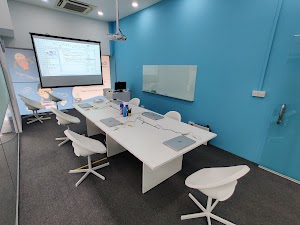
Students will attend their classes onsite. Laptop and all necessary equipment are provided. Online classes are available on a case-by-case basis.
Onsite Classes are conducted in our spacious classrooms in Computhink@ToaPayohLibrary.

FAQs
Does my teen need coding experience?
Yes. This camp is for teens aged 12 to 16 who have done some coding, in our classes or elsewhere. It builds on that experience with a real project, from idea to finished app.
What kind of app will my teen build?
A web app of their own idea: something they would use themselves, something that helps their community, or an original idea. They plan it, build it with AI, and finish with a working app to share with friends and family.
Which AI tool will my teen use?
We choose and set up the AI build tool for the camp, and teach students how to prompt and work with it effectively.
How is this different from your other holiday camps?
Our other camps centre on games and suit first-time coders. This camp runs like a startup sprint: students think through an idea, plan it, build it with AI and present it.
Will I get to see what my teen built?
Yes. At the end of the camp, students present their app to parents and answer questions about the choices they made.
What does my teen need to bring?
Laptops, the AI build tool and all equipment are provided, so your teen just arrives ready to build.
What are the camp timings?
Monday to Wednesday, 9:30 am to 12:30 pm, 3 hours a day. Your teen joins one week of the camp.
How many students are in each class?
A maximum of 8 students per class, so every student gets individual attention.
Do you provide a certificate?
Yes. Every student receives a certificate of completion at the end of the camp.
Follow Us on Our Socials!
Follow us for coding tips, updates, exclusive discounts and more!